Type a load once, and never type it again.
Customer, route, driver and equipment on one row, with today's work on top and delivered history underneath. No spreadsheet running alongside it.

Dispatch a load once, follow it live from the driver's phone, and bill it the same day, from one board.

The load you enter once is the load the map tracks and the load you bill. Nothing is keyed in twice.
Customer, route, driver and equipment on one row, with today's work on top and delivered history underneath. No spreadsheet running alongside it.
Open a load and you have the driver, the truck, the speed it is doing and when it is due in. A truck that stops reporting gets flagged instead of looking parked.

Every load carries its billing state on its own row: paid, synced, queued, or an error to retry. An invoice that failed to reach the books shows up the day it failed, not at month end.

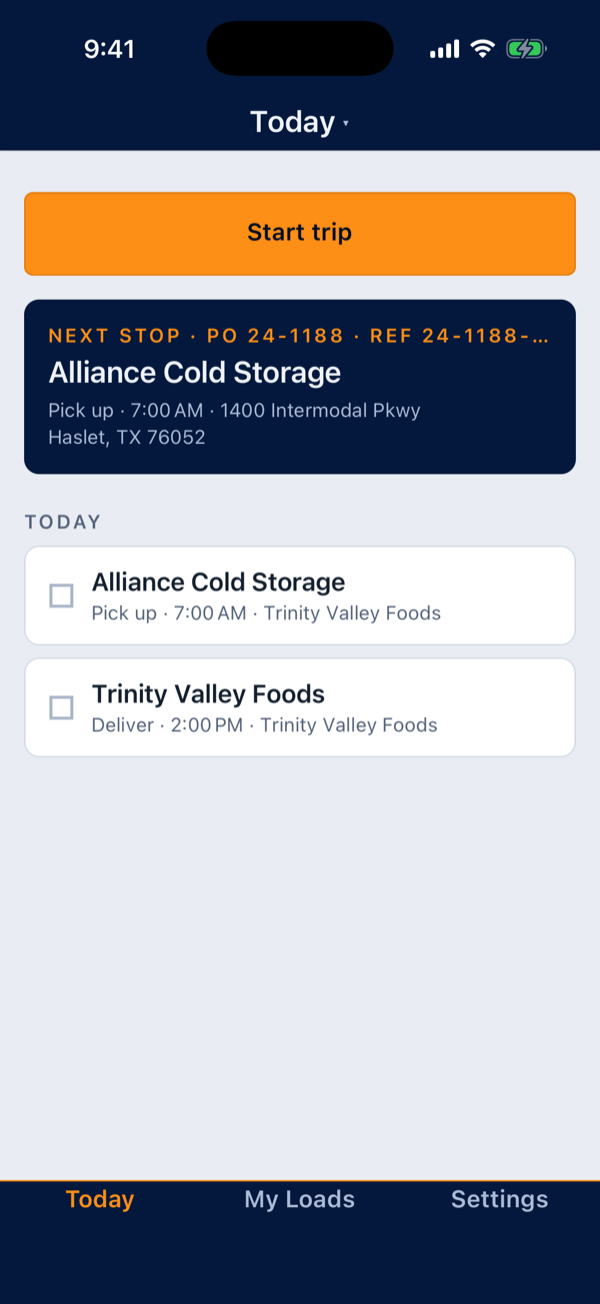
Stops in order, messages with dispatch, and the driver's schedule, hours and time off are in the same app.


Connect your accounting software once, and every invoice you bill here goes across by itself.
Works with




Send rate confirmations and agreements for signature with a name and a click.
No install day and no hardware to buy: a driver's phone reports in minutes.
Open the demo and you have a working fleet that is yours to drive, no signup. When you are ready, create an account and put your own loads on it.
A user is anyone who signs in that month, dispatcher or driver. Deactivate someone and they are off the bill.
One subscription, priced per user, covers dispatch, tracking, invoicing, documents and the driver app.
Write to hello@ladeway.com with how many trucks you run, and we will walk you through the dispatch board, an invoice and the live map with your own work on them.
We will write to set up a walkthrough of the board, an invoice and the live map. If you would rather start the conversation yourself, write to hello@ladeway.com.